

Description
Download HikCentral HD APK – video surveillance app, remote monitoring, live view, PTZ control, HikCentral, Blazer Pro
Overview
HikCentral HD is a dedicated multimedia video application designed for Android devices, enabling remote access to surveillance systems managed through HikCentral and Blazer Pro platforms. The app allows users to monitor live video feeds, perform remote playback, control PTZ (Pan-Tilt-Zoom) functions, and capture video clips directly from connected devices. It is particularly suited for security professionals and individuals who require real-time oversight of their properties, whether residential, commercial, or industrial. The app supports connectivity via Wi-Fi, 2G, 3G, and 4G networks, ensuring accessibility across various environments and network conditions. Designed with usability in mind, the interface is intuitive and easy to navigate, reducing the learning curve for new users. It is compatible with Android 4.4 and higher, making it accessible to a broad range of devices. The developer did not provide additional system requirements. The app is regularly updated to maintain compatibility with evolving network standards and connected hardware. HikCentral HD is ideal for users seeking a reliable, mobile-based solution for continuous monitoring of their surveillance infrastructure.
Key Features & Capabilities
- Live View Monitoring: Enables real-time streaming of video from connected surveillance cameras, allowing users to observe activities as they happen from any location with network access.
- Remote Playback: Offers the ability to review recorded footage from the connected HikCentral or Blazer Pro system, supporting efficient incident investigation and evidence retrieval.
- PTZ Control: Provides remote control over pan, tilt, and zoom functions of compatible cameras, allowing precise adjustment of the viewing angle without physical access to the device.
- Video Clipping: Allows users to capture and save short video segments directly from live or recorded streams, useful for documenting events or sharing evidence.
- Multi-Network Support: Functions across Wi-Fi, 2G, 3G, and 4G networks, ensuring consistent access regardless of the available connection type.
- Compatibility with HikCentral & Blazer Pro: Integrates seamlessly with both platforms, enabling centralized management of surveillance systems from a mobile device.
These features are particularly valuable in security operations, where timely access to video data and remote control capabilities are critical. For example, a security manager can monitor a warehouse during off-hours, adjust camera angles to investigate suspicious movements, and save relevant footage—all from a mobile device. Similarly, a homeowner can check on their property while traveling, ensuring peace of mind through immediate visual verification.
User Interface, Workflow & Performance
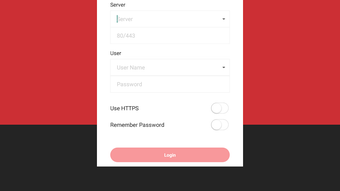
The user interface of HikCentral HD is designed for clarity and ease of navigation, with a layout that prioritizes quick access to core functions such as live view, playback, and PTZ controls. Menus are logically organized, and icons are intuitive, reducing the need for extensive training. The workflow is streamlined, allowing users to switch between connected devices and functions with minimal taps. The app supports high-quality video playback and fast streaming, which contributes to a responsive user experience. However, exact performance details were not specified by the developer. The app’s stability and resource usage behavior are not publicly documented. The developer did not specify resource usage details. Performance observations are based on general software behavior patterns. Users may experience variations depending on network speed, device capabilities, and the number of active camera streams. The app is regularly updated, suggesting ongoing efforts to improve reliability and performance.
Compatibility & System Requirements
HikCentral HD is designed for Android operating systems and is compatible with Android 4.4 and higher versions. The app has a file size of 32.5 MB, which is relatively lightweight for a multimedia application. It does not support Blazer Express, indicating a focus on newer or more advanced system integrations. The developer did not provide additional system requirements. Compatibility information was partially provided. Users should ensure their devices meet the minimum Android version requirement to install and run the application. No specific hardware requirements such as RAM or CPU specifications were listed. The app is intended for use on mobile devices with standard camera and network capabilities.
Pros and Cons
Pros
- Free to download and use, making it accessible for a wide range of users.
- Supports remote monitoring via multiple network types, including 2G, 3G, 4G, and Wi-Fi.
- Intuitive interface with easy navigation and quick access to key functions.
- Offers essential security features like live view, PTZ control, and video clipping.
- Regular updates ensure compatibility with evolving systems and network environments.
- Compatible with both HikCentral and Blazer Pro platforms.
Cons
- Does not support Blazer Express, limiting compatibility with older systems.
- Exact system requirements were not listed, which may cause uncertainty for some users.
- Performance details such as CPU or RAM usage were not provided.
- Only available for Android, with no support for iOS or other platforms.
- Limited information on data usage and background operation behavior.
FAQ Section
Is HikCentral HD compatible with iOS devices?
No, the app is currently available only for Android devices. There is no official iOS version available at this time.
Can I use HikCentral HD without an internet connection?
No, the app requires a network connection—either Wi-Fi or mobile data (2G, 3G, 4G)—to access live streams and remote features. It does not support offline functionality.
Is the app secure to use?
HikCentral HD is developed by Hikvision, a known provider in the surveillance industry. The app uses standard network protocols for data transmission. However, no specific security details were provided by the developer.
How often is the app updated?
The app is regularly updated to ensure compatibility with new devices and network conditions. The frequency of updates is not publicly disclosed.
What license type does HikCentral HD use?
The app is free to download and use. No licensing fee is required. The developer did not specify additional licensing terms.
Final Thoughts + CTA
HikCentral HD delivers a reliable, feature-rich solution for remote video surveillance on Android devices. Its ability to support live view, PTZ control, and remote playback across multiple network types makes it a practical tool for both professionals and private users. The intuitive interface enhances usability, while regular updates ensure long-term functionality. Although it lacks support for Blazer Express and does not provide detailed system requirements, its core capabilities remain strong. For anyone managing a HikCentral or Blazer Pro surveillance system, this app is an essential companion for real-time monitoring. Download HikCentral HD now and take control of your security from anywhere.
Guides & Tutorials for HikCentral HD APK
How to install HikCentral HD APK
- Click the Preview / Download button above.
- Once redirected, accept the terms and click Install.
- Wait for the HikCentral HD APK download to finish on your device.
How to use HikCentral HD APK
This software is primarily used for its core features described above. Open the app after installation to explore its capabilities.
User Reviews for HikCentral HD APK 0
No reviews found





